Browse Getting Started
- Dashboard overview
- Insights overview
- Sites Overview - Network Deployments
- Policies Overview - Create and Edit
- Custom Lists overview
- Clients Overview - Device Agents and Profiles
- Users Overview - Directory Users and Personas
- Organizations Overview - MSP Tenant Management
- Lookup Tool Overview
- Query Log Overview
- Settings Overview - Account Administration
- Help & Support Overview
- Signing In - Login, 2FA, and Password Reset
- Two-factor authentication (2FA)
- Add system users (role-based access)
- Check domain classification with the Lookup Tool
- Configurable objects and their associations
- Configure notifications
- Working with organizations (multi-tenant)
- Working with policies
- Content categories
- Security categories
- Application categories (Zero Trust app management)
- Working with allow and block lists
- Zero Trust TLD Filters
- Safe Search explained
- Safe Search supported search engines
- YouTube Restricted Mode explained
- Custom block pages
- Prevent DNS bypass
- Don't mix DNS providers
- Active Directory group policies
- Entra ID group policies
- Tracking individual users
ScoutDNS resolver IPs
Where to find the ScoutDNS anycast resolver IPs in the Admin Console, plus what's available (primary, secondary, IPv6) and how the closed-resolver model works.
ScoutDNS runs a global anycast resolver network. From anywhere in the world, the same pair of IPs routes to the geographically nearest resolver for the lowest latency. The exact addresses are visible in the Admin Console.
Where to find your resolver IPs
In the Admin Console, click the Help icon (top right) and select IPs List.
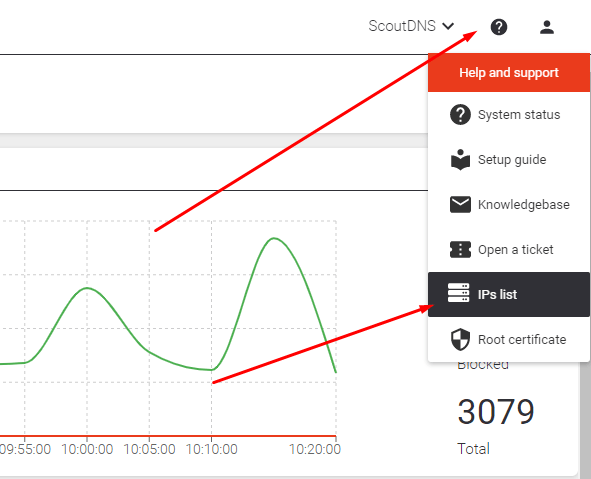
We expose:
- Primary and secondary anycast IPv4 (the two you’ll use 99% of the time, for WAN forwarding)
- Direct-access IPv6 addresses per location, available on request for customers who need them
Closed resolver model
[!IMPORTANT] ScoutDNS is a closed resolver. It only responds to queries from networks you’ve registered (by WAN IP) or from devices running the roaming agent. Hitting the resolver IPs from an unregistered network will return no response, by design.
If you’re getting no resolution after pointing your network at the ScoutDNS IPs, the most common cause is that your WAN IP hasn’t been registered in the Admin Console yet. See the Quickstart: WAN forwarding for the registration step.