 vs. DefensX
 ScoutDNS vs DefensX: Focused Protective DNS or Broader Browser Security?
ScoutDNS is purpose-built as a protective DNS security platform. DefensX includes DNS protection within a broader platform for secure browsing, credential controls, DLP, browser isolation, human-risk reduction, and ZTNA. The right choice depends on whether you want best-of-breed DNS security that complements your existing stack, or those broader controls consolidated with one vendor.
The quick answer
Choose ScoutDNS when you want best-of-breed protective DNS, a platform built around DNS policy, resolver control, investigation, and network-wide deployment that works alongside the browser, endpoint, and DLP tools you already trust. Choose DefensX when you want DNS filtering plus browser-level phishing, credential, DLP, isolation, and ZTNA controls consolidated under a single vendor and agent.
What both platforms do well
Why organizations choose ScoutDNS
Purpose-built protective DNS
DNS security is the whole product. Policy, deployment, investigation, and MSP operations are all designed around protective DNS, not added to a broader suite.
Encrypted DNS on port 443
On supported Windows clients in healthy operation, normal public DNS resolves over DoH to ScoutDNS resolvers, with common unauthorized encrypted-DNS paths restricted.
Full DNS-response visibility
See the answers, not just the requests: 30 days of searchable query logs with full RDATA and raw response inspection.
DNS-first policy controls
Reusable global and policy-scoped lists, application categories, and Zero Trust TLD filters that can deny unapproved TLDs by default.
Complete site deployments
WAN and LAN policy, cloud-managed on-premises relays, local forwarding, and coverage for guest, BYOD, and headless devices that cannot run software.
SIEM export included
Included with MSP and roaming-client plans. Retention lands under your own storage policy, including indefinitely.
1. Keep public DNS on an authorized encrypted resolver path
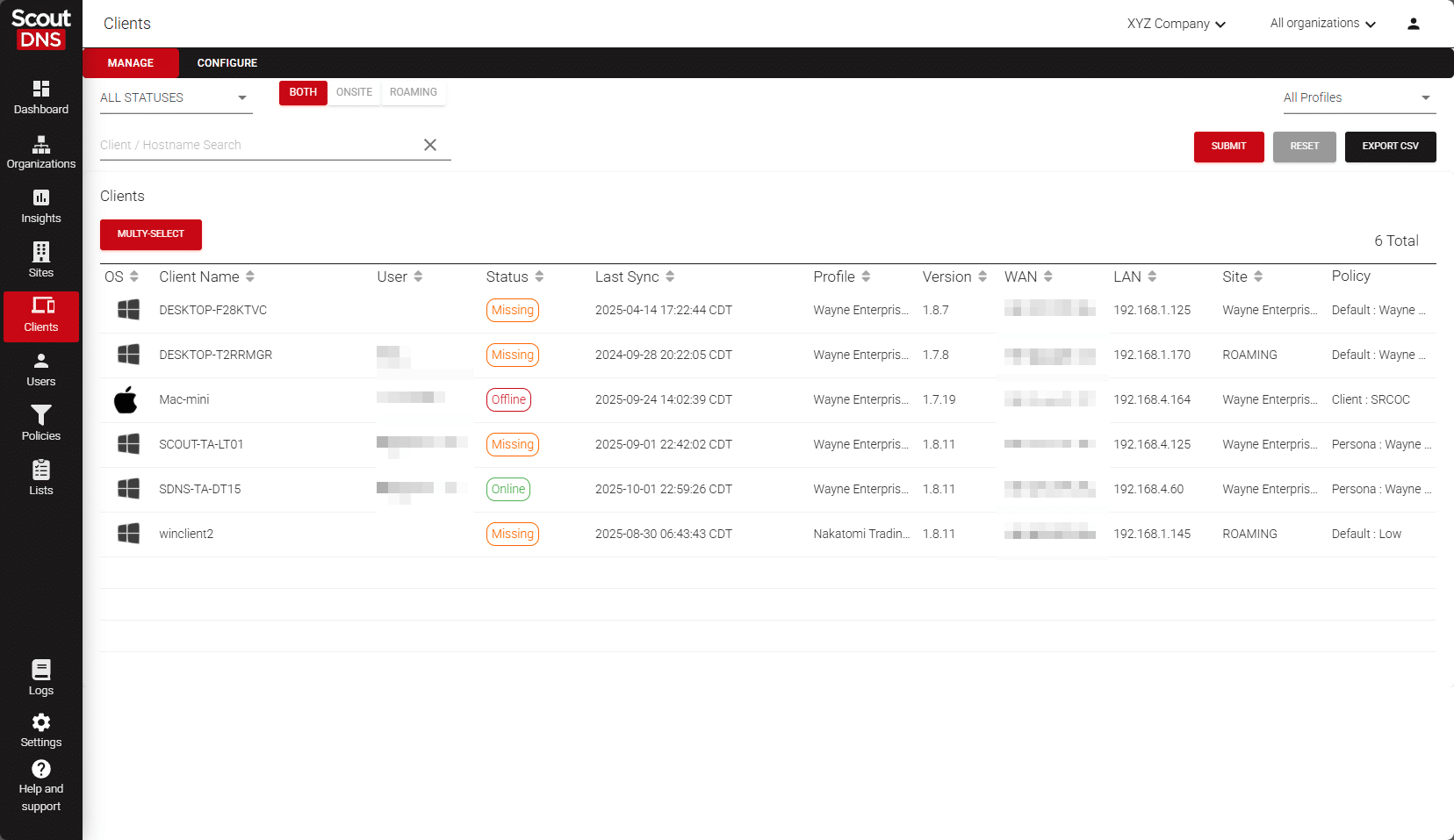
The ScoutDNS Windows Client protects supported devices at the network layer without rewriting adapter DNS settings. During healthy operation, normal public DNS is resolved by ScoutDNS over encrypted DoH on standard HTTPS port 443, approved internal domains can still use your enterprise resolvers, and the client helps restrict common unauthorized DoH, DoT, and DoQ paths.
DefensX documents a different endpoint model: its agent sends policy lookups to the DefensX cloud over secure messaging, its DNS Proxy Mode forwards queries to the DNS servers the operating system already uses, and its Kernel Mode inspects DNS without changing the configured servers. Its separate network deployment can forward whole networks to DefensX Anycast Cloud DNS, optionally over DoT. Choose ScoutDNS when you want the endpoint's own public DNS resolved through an authorized encrypted ScoutDNS path.
2. Investigate the full DNS response, not only the destination
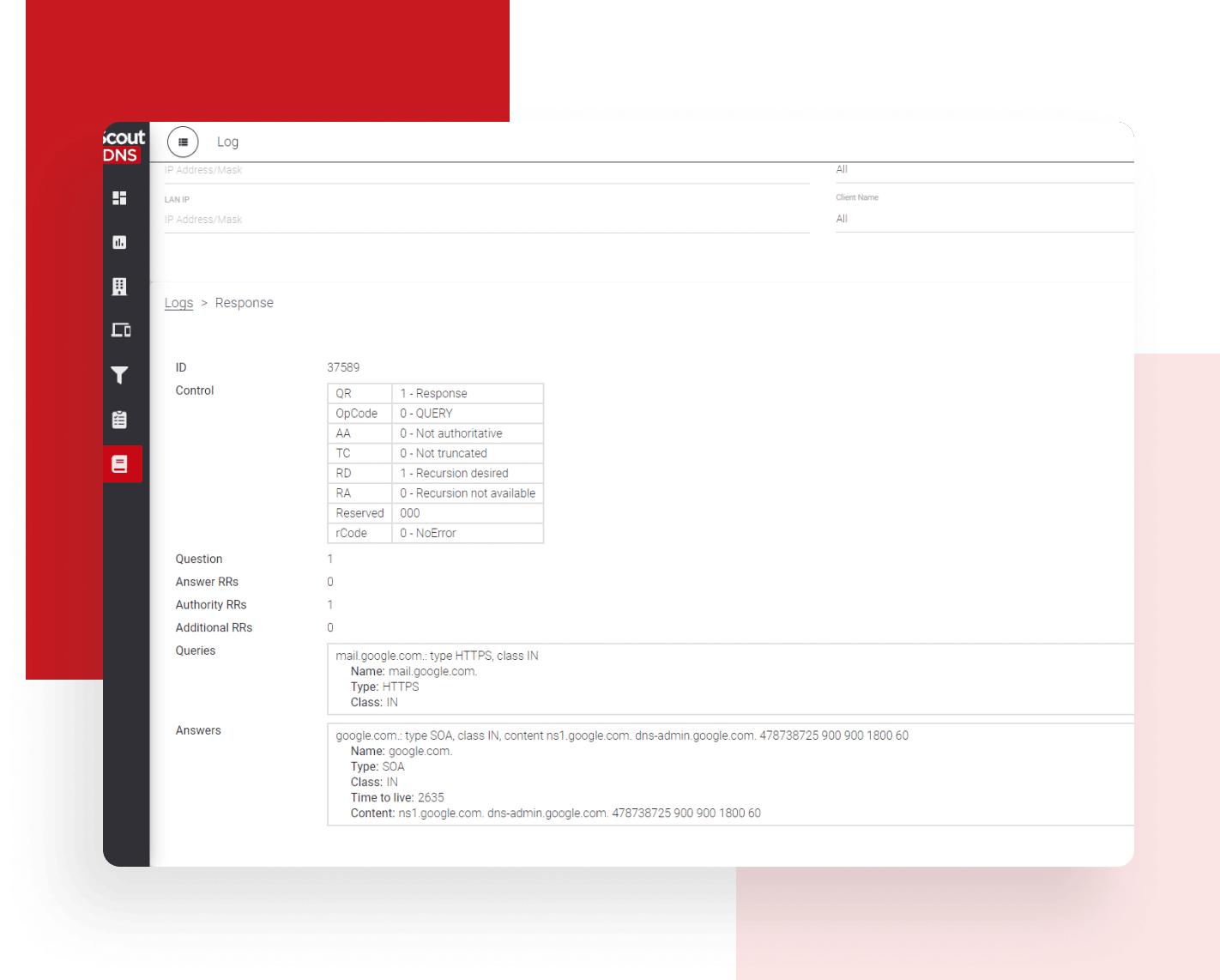
ScoutDNS keeps a live and 30-day searchable per-query log where each event can show the FQDN, query type, resolver, latency, category, policy decision, device and user context, and the complete DNS response packet, including the Queries, Answers, Authority, and Additional sections. When an investigation needs the answer that actually came back, that evidence is one click away.
DefensX provides DNS and URL logs, scheduled reports, APIs, and a documented QRadar integration. As of August 7, 2026, the documentation we reviewed does not describe an equivalent portal workflow for inspecting raw DNS responses or full RDATA.
3. Build policy specifically for DNS
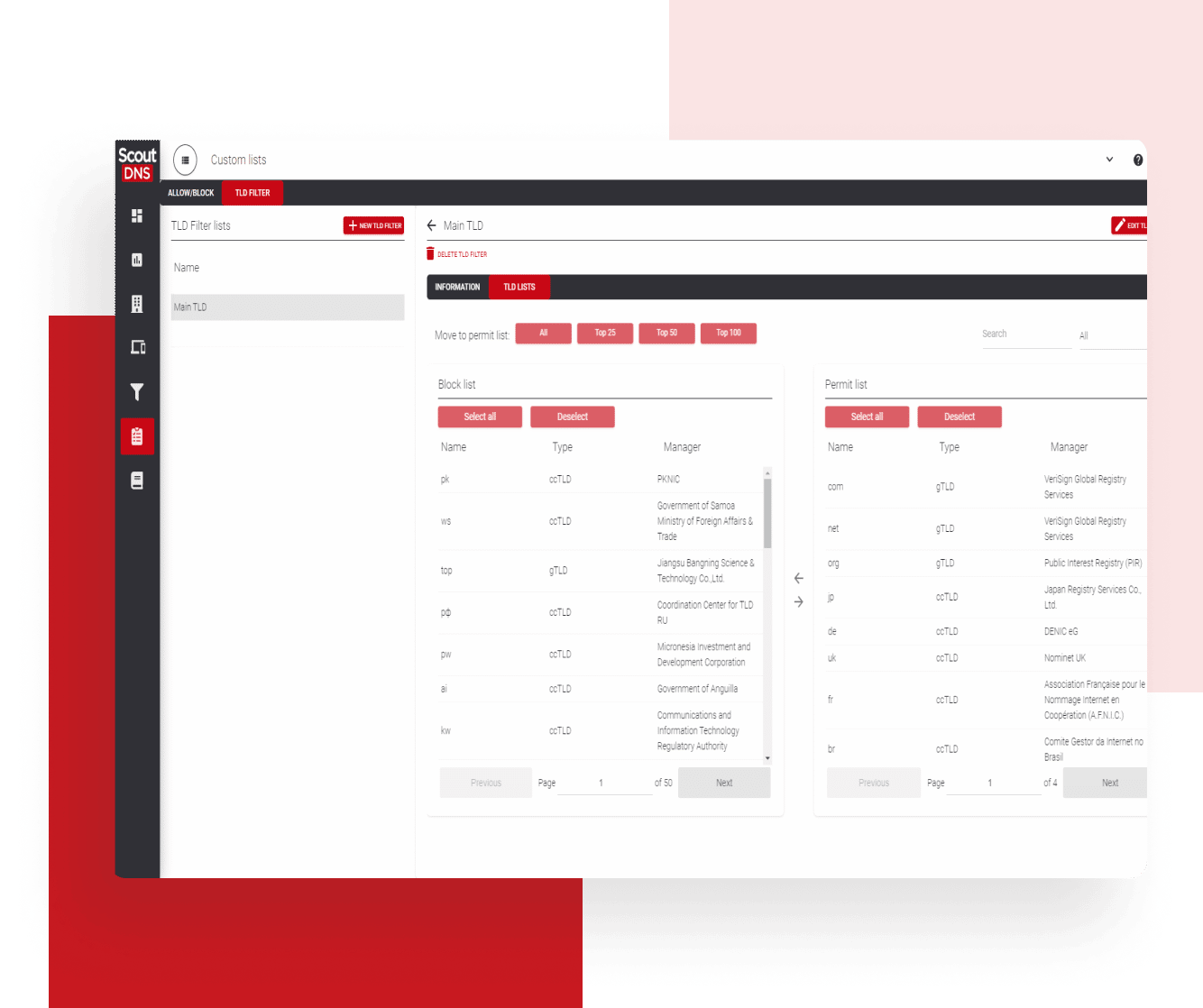
ScoutDNS policy is made of DNS objects: reusable allow and block list objects, multiple global lists, application-category controls, and Zero Trust TLD filters that can allow trusted TLD sets while denying newly introduced or unapproved TLDs by default. Policies attach to WANs, LANs, client profiles, individual devices, AD and Entra personas, and MSP organizations.
DefensX has strong web-policy machinery of its own: custom URL groups, public partner lists, policy templates, risk and category rules, and separate targets for Browser, Agent DNS, and Cloud DNS. The difference is orientation. DefensX policy breadth centers on web categories and in-browser response actions, while ScoutDNS policy is built around DNS controls such as TLDs, applications, lists, and deployment scopes.
4. Run protective DNS without deploying a broader browser stack
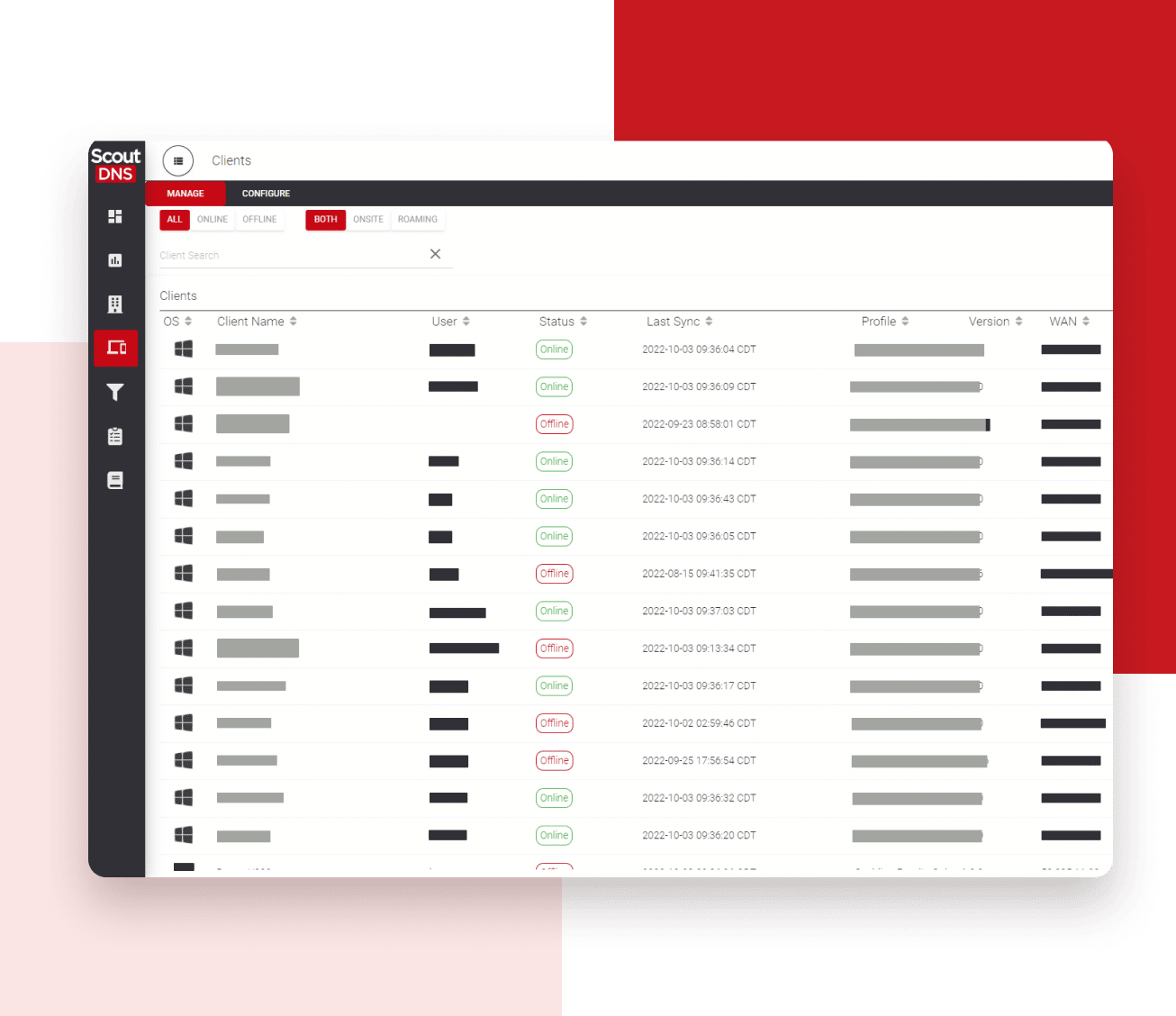
Manage complete sites as first-class DNS deployments: WAN and LAN policy, on-premises relays that are remotely adopted and fully cloud-managed, local forwarding, redirects, and live health, all resolving through the ScoutDNS global anycast network. That network announces ScoutDNS-owned address space from ScoutDNS's own autonomous system, so routing announcements and anycast behavior stay under ScoutDNS control. Relays give printers, servers, guest networks, and BYOD devices that cannot run an agent encrypted DNS to the ScoutDNS cloud, with policy by subnet or VLAN. Technicians can temporarily disable and re-enable an individual Windows client from the Control Plane, so the administrator controls the troubleshooting step without granting end users an ongoing bypass.
DefensX also offers agentless Anycast Cloud DNS, delivered as of August 7, 2026 through AWS Global Accelerator on Amazon's network, plus remote agent configuration, remote uninstall, and an administrator-enabled five-minute end-user bypass. The operational difference is what the platform is organized around: with ScoutDNS, networks, relays, roaming clients, users, and MSP tenants all live in one DNS-focused model, with no browser extension or dedicated browser required to reach full value.
ScoutDNS vs DefensX at a glance
| Comparison factor | ScoutDNS | DefensX |
|---|---|---|
| Primary focus | Purpose-built protective DNS: policy, deployment, investigation, and MSP operations designed around DNS security | Broader browser, workspace, and human-risk platform that includes DNS protection alongside phishing, credential, DLP, isolation, and ZTNA capabilities |
| Windows DNS enforcement | System-level interception without adapter DNS or NRPT changes; normal public DNS uses encrypted DoH on port 443 in healthy operation | Kernel Mode inspects DNS without changing Windows DNS settings; Proxy Mode uses loopback and the DNS servers already configured on the device |
| Endpoint resolver path | Public internet DNS resolved by ScoutDNS over DoH during healthy operation; approved internal domains can use enterprise resolvers | Endpoint agent performs cloud policy lookups; documented Proxy Mode retains the operating system’s configured resolver path |
| Network DNS deployment | WAN and LAN sites with static or dynamic IP, plus on-premises relays that are remotely adopted and fully cloud-managed; both resolve through the ScoutDNS global anycast network, with local forwarding, redirects, and live health | Agentless Anycast Cloud DNS with registered public IP or DDNS records, multiple resolver pairs, network segmentation, and optional DoT |
| Resolver network operation | Operates its own autonomous system and announces ScoutDNS-owned anycast resolver address space, with routing announcements and anycast behavior under ScoutDNS control | Documented Anycast Cloud DNS; as of August 7, 2026, its published default resolver addresses are announced through Amazon’s network via AWS Global Accelerator |
| DNS investigation | 30 days of searchable query logs with query type, resolver, latency, decision context, and the complete DNS response packet including full RDATA | DNS and URL logs, scheduled reports, APIs, and QRadar integration; as of August 7, 2026, the documentation we reviewed does not describe raw DNS-response or RDATA inspection |
| DNS-specific policy | Reusable global and policy-scoped allow/block lists, application controls, and Zero Trust TLD filters that can deny unapproved TLDs by default | Custom URL groups, partner-public groups, policy templates, risk and category rules, and separate Browser, Agent DNS, and Cloud DNS targets |
| Browser-level controls | DNS and application policy; designed to coexist with the browser-security stack you choose | AI visual phishing detection, credential protection, file and data controls, isolation and read-only modes, and higher-tier ZTNA in supported browsers |
| Roaming laptop protection | Windows and macOS clients | Windows and macOS agents on x64 and ARM64; Windows offers Kernel and Proxy modes, macOS currently operates without Kernel Mode |
| Mobile devices | No current native iOS or Android client | Dedicated secure browser for iOS and Android; reviewed documentation does not establish device-wide DNS enforcement for every app |
| Directory-driven policy | Native AD and Entra ID group policies configured in-platform, no sync tools to install | Agent-based AD group lookup through Windows APIs and Entra group retrieval through Microsoft Graph, no separate full-directory sync service |
| Individual client troubleshooting | Administrator-controlled temporary disable and re-enable, forget, and uninstall actions from the Control Plane | Remote configuration and uninstall; an administrator can enable a five-minute end-user bypass for captive portals and troubleshooting |
| Native log retention | 30 days searchable in the portal | 30 days on Core; 90 days on Premium |
| External log retention | SIEM export included with MSP and roaming-client plans; customer-controlled retention can be indefinite | Customer API and documented QRadar pull integration; confirm package inclusion; exported data can be retained under your own policy |
| MSP administration | Multi-tenant health, sites, profiles, personas, usage and billing reporting, roles, API, and included support | Partner and customer RBAC, policy templates, public URL groups, APIs, RMM and PSA support, bulk customer creation, and scheduled reporting |
| Commercial terms | Published MSP entry pricing, month-to-month or annual options, support included | Public dollar pricing not shown; DefensX states one-license start, no minimum commitment, mixed tiers, and cancel-anytime terms |
| EU DNS data handling | EU DNS-query processing and DNS-log storage available on regional infrastructure | GDPR commitment published; DNS-processing and log-storage regions were not identified in the public sources we reviewed, so confirm contractually |
Last checked August 7, 2026. Sources: ScoutDNS pricing, DefensX packages, DefensX Operating System Agent docs, DefensX agentless network deployment docs, DefensX QRadar integration docs .
Where DefensX stands out
DefensX is a capable, modern platform, and when the requirement extends beyond protective DNS it can be the better fit:
- Browser-level security depth: AI visual phishing detection, credential protection, web and AI DLP, file controls, remote browser isolation, and higher-tier ZTNA inside supported browsers.
- Session-aware response actions: policies can isolate a page, render it read-only, or control credential entry and file transfers, actions DNS-layer filtering cannot apply on its own.
- Secure mobile browser: dedicated iOS and Android browsers with built-in policy enforcement, a genuine advantage for organizations willing to standardize mobile web access on the DefensX browser.
- Windows Server, ARM64, and VDI coverage: agents for Windows, Windows Server, and macOS on x64 and ARM64, with per-user browser policy in shared Terminal Server, Citrix, and Azure Virtual Desktop environments.
- Longer native retention on Premium: DefensX publishes 90-day portal log retention on its Premium tier, against 30 days on Core and 30 days of searchable history in ScoutDNS.
- Flexible licensing terms: start with a single license, no minimum commitment, mix packages across customers, and cancel at any time.
Which platform is right for you?
Choose ScoutDNS when:
- You want best-of-breed protective DNS that complements the security stack you already run
- Public DNS should resolve through an authorized encrypted ScoutDNS path on supported Windows devices
- Full DNS-response and RDATA investigation matters
- Trusted-TLD, application, and reusable DNS-list policy are priorities
- Networks, relays, roaming laptops, users, and MSP tenants should live in one DNS-focused platform
- SIEM export should be included, with exported retention under your control
Choose DefensX when:
- Browser-level visual phishing and credential protection should come from the same vendor as DNS filtering
- Web or AI DLP, file controls, browser isolation, or ZTNA belong in the same purchase
- Per-user browser policy in shared VDI or Terminal Server environments is important
- Windows Server, ARM64, or a dedicated iOS and Android secure browser is required today
- A 90-day native portal retention window is worth the Premium tier
- Starting with a single license and no minimum commitment is a deciding factor
Frequently asked questions
Is DefensX a DNS filter or a secure browser platform?
Both, by design. DefensX provides system-wide DNS protection through its agent and agentless Anycast Cloud DNS, then layers browser-level capabilities such as AI visual phishing detection, credential protection, DLP, isolation, and ZTNA on top through its browser extension and dedicated mobile browser. ScoutDNS takes the opposite shape: it is purpose-built as a protective DNS platform, with policy, deployment, and investigation all organized around DNS.
Does DefensX protect applications outside the browser?
At the DNS layer, yes. The DefensX agent applies DNS policy system-wide, and its Cloud DNS covers whole networks. Its most differentiated capabilities, including visual phishing detection, credential controls, DLP, and isolation, operate inside supported browsers through its extension or dedicated mobile browser.
How do ScoutDNS and DefensX handle Windows DNS?
Both intercept DNS without asking you to rewrite Windows DNS settings. ScoutDNS uses system-level interception, and during healthy operation resolves normal public DNS over encrypted DoH on port 443 to ScoutDNS resolvers while helping restrict common unauthorized encrypted-DNS paths. DefensX documents two Windows modes: Kernel Mode, which inspects DNS without changing settings, and DNS Proxy Mode, which uses a loopback listener and re-sends queries to the DNS servers the device already uses.
Which platform sends public DNS to its own encrypted resolvers?
On supported Windows devices during healthy operation, ScoutDNS resolves normal public DNS through an encrypted connection to ScoutDNS resolvers, and approved internal domains can still use enterprise resolvers. The DefensX endpoint documentation we reviewed describes cloud policy lookups over secure messaging while the device retains its existing configured resolver path; its separate network deployment can forward queries to DefensX Anycast Cloud DNS, optionally over DoT.
Which platform provides more detailed DNS investigation?
ScoutDNS shows the request and the complete answer: 30 days of searchable query-log history with query type, resolver, latency, category, policy decision, device and user context, and the full DNS response packet including the Queries, Answers, Authority, and Additional sections. DefensX provides DNS and URL logs, scheduled reports, APIs, and a QRadar integration; as of August 7, 2026, the documentation we reviewed does not describe an equivalent workflow for inspecting raw DNS responses or full RDATA.
Do both platforms support Active Directory and Entra ID?
Yes, and both do it without a separate full-directory sync service. ScoutDNS configures AD and Entra ID group policies natively in-platform with no sync tools to install. The DefensX Windows agent reads logged-in AD group membership through standard Windows APIs and retrieves Entra ID groups through Microsoft Graph. Directory support is not a strong differentiator in either direction.
Does DefensX protect iOS and Android devices, or only browsing inside its app?
DefensX provides a dedicated secure browser for iOS and Android with built-in policy enforcement. The documentation we reviewed describes protection inside that browser rather than device-wide DNS enforcement for every app. ScoutDNS does not currently offer a native iOS or Android client, so mobile coverage favors DefensX for organizations willing to standardize on its browser.
Can ScoutDNS and DefensX export logs to a SIEM?
Yes, both. ScoutDNS includes SIEM Data Export with MSP and roaming-client plans, so query and event data streams to your own SIEM or storage and retention is controlled entirely by your policy, including indefinitely. DefensX provides a Customer API and a documented QRadar pull integration covering DNS, URL, and other log types; confirm how API and SIEM access is packaged in the tier you are quoting.
Which is better for an MSP that only wants protective DNS?
If protective DNS is the whole requirement, ScoutDNS is the closer fit: the entire platform, from sites and relays to roaming clients, personas, and tenant billing, is organized around DNS operations, with SIEM export and support included and MSP pricing published. DefensX is the stronger candidate when the same purchase should also cover browser-level phishing, credential, DLP, isolation, or ZTNA controls.
Purpose-built DNS security, depth included
If your priority is purpose-built protective DNS with controlled resolution, deeper DNS evidence, and flexible MSP deployment, see how ScoutDNS fits your environment. Start a full-featured 14-day trial or schedule a technical comparison.
About this comparison: based on a point-in-time review of publicly available vendor documentation, pricing pages, and product materials, last checked August 7, 2026. Product capabilities, packaging, and pricing change frequently, and DefensX may have updated its offering since our review. Nothing on this page is a claim about your specific quote or environment; verify current details with each vendor before making a purchasing decision. DefensX and related marks are trademarks of their respective owners. ScoutDNS is not affiliated with or endorsed by DefensX, Inc. See something out of date? Let us know and we will review it.