DNS is defined by open standards, but DNS behavior varies widely across operating systems, because those standards define a protocol and leave the implementation open. Each operating system ships its own DNS client stack, caching logic, fallback mechanisms, and ideas about how name resolution should integrate with applications and networks.
Those differences decide which resolver answers, how long answers stick around, and what happens when the first attempt fails.
DNS resolution starts at the operating system
Most applications never implement DNS themselves. They hand names to the operating system, whose stub resolver decides which name servers to query, whether to consult a cache, which resolution mechanisms to try in what order, and how long to wait before retrying or giving up.
DNS standards constrain resolver behavior, covering caching, retries, and failure handling, but they stop short of defining one operating-system-wide resolution policy. How DNS combines with interfaces, VPN rules, local files, mDNS, and application APIs is left open, so each OS has evolved its own answers shaped by usability, backward compatibility, and the networks it expects to live on.
macOS: multi-layered and service-aware
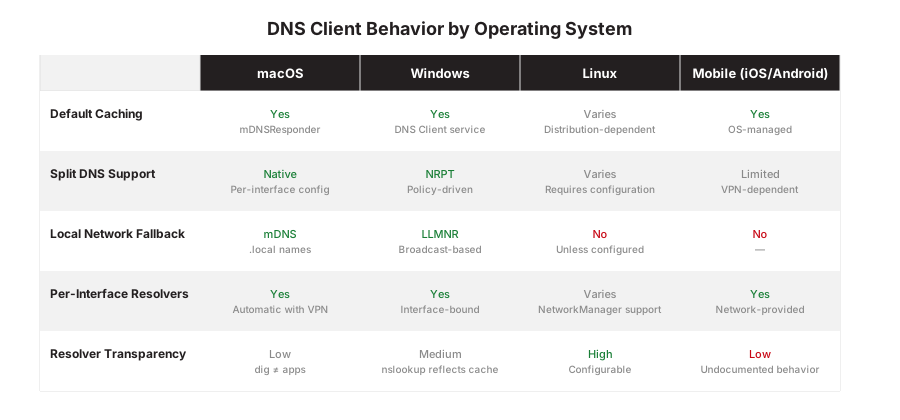
macOS combines unicast DNS, multicast DNS (mDNS), and system-wide caching in one resolver architecture. It can apply different DNS configurations per network interface, and it routes .local names through mDNS and shares one cache across applications that use the system resolver rather than caching per process.
One consequence is that macOS DNS can look opaque from the command line. dig queries DNS servers directly and bypasses the system resolver entirely, so it often disagrees with what applications experience. dscacheutil -q host and dns-sd test resolution through Apple’s native resolver stack, which is much closer to what applications actually get.
Windows: resolution order and policy layers
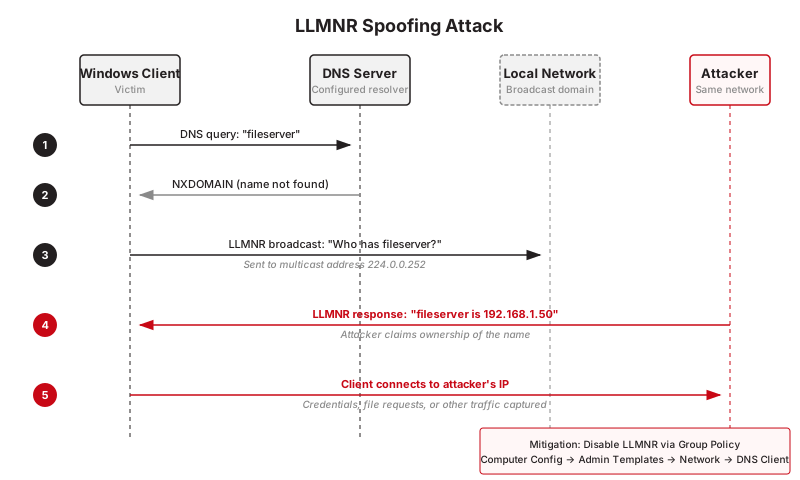
Windows follows a defined resolution order and wraps standard DNS in policy and compatibility layers. The Windows DNS Client service integrates with enterprise controls such as the Name Resolution Policy Table (NRPT), and can fall back to local network name resolution mechanisms such as LLMNR.
In enterprise environments, NRPT rules override what looks like normal DNS behavior, directing specific namespaces to particular resolvers, sometimes with additional validation requirements attached. Windows also maintains an OS-level DNS cache shared by applications that resolve through the system, which is where “the record changed but this machine disagrees” problems usually live. Browsers are the notable exception on both platforms, since most can run their own DNS or DoH client and skip the system path entirely.
Linux: flexible and distribution-dependent
Linux has no single DNS behavior. Resolution depends on the distribution, the init system, and the resolver stack in play.
Historically that stack was a simple stub in the C library. Modern systems layer on systemd-resolved, NetworkManager, or a local caching forwarder, so caching may or may not exist by default, split DNS depends on local configuration, and two distributions can behave nothing alike. You get real transparency and control, and you pay for it in consistency.
systemd-resolved enabled caches DNS responses locally and supports split DNS learned from NetworkManager. A minimal server distribution may rely on a non-caching libc stub resolver and forward all queries directly to the configured name server. The same hostname queried at the same time can produce different behavior due to resolver architecture, not DNS data.
Containers can add yet another layer. Depending on the platform and network mode, a container may inherit the host’s DNS settings or query an embedded, cluster, or node-local resolver, so an application may be talking to something no one configured on the host or the network.
Mobile platforms: optimized for networks that change
Mobile operating systems prioritize battery life, performance, and survival on unreliable networks, and their DNS behavior follows. On iOS and Android, DNS servers arrive dynamically from the active network, caching is tightly controlled and sometimes undocumented, and features like Private DNS or encrypted DNS can override network-provided resolvers outright.
Mobile platforms also wire DNS into connectivity checks and captive portal detection, which produces behavior that looks strange next to a desktop, such as aggressive re-querying when hopping between cellular and Wi-Fi, or configured DNS servers being temporarily bypassed during network validation.
Why these differences matter
Every one of these differences surfaces somewhere practical. Troubleshooting steps that work on one OS mislead on another. VPN and split DNS setups live or die on resolver behavior. DNS-based security controls cover exactly as much as the client’s resolution path lets them cover. Applications behave consistently across platforms only to the extent the resolvers underneath them do.
Assume DNS works the same everywhere and the false conclusions write themselves. A lookup that succeeds on Linux fails on Windows, a macOS cache outlives its record change, and a phone switches to a new network’s resolver mid-conversation. In each case a different client made a different call, and DNS itself worked exactly as designed.
Summary
The protocol is shared, but every operating system wraps it in its own resolution policy, and that policy decides what a lookup actually does on a given machine.
So when a DNS issue lands on your desk, start by asking three questions. Which API is the application using to resolve names, does that path go through the system resolver or around it, and which caches sit between the question and the answer? The answers differ by operating system, and they’re usually where the mystery ends.