Not every name lookup goes to a DNS server. Many operating systems also resolve names by asking the local network directly, multicasting the question and waiting to see whether any host claims the name. Multicast DNS (mDNS) and Link-Local Multicast Name Resolution (LLMNR) are the two protocols that do this.
The traffic looks like DNS on the wire, but no DNS server is involved, and none of DNS’s delegation or authority rules apply. Both protocols exist so hosts can find each other on networks where nobody set up DNS.
Why local name resolution exists
Traditional DNS assumes a configured recursive resolver, globally unique names, and reachable authoritative servers. Those assumptions fail on small or temporary networks where none of that exists. The original use cases were ad hoc networks, home LANs, and early service discovery. A printer or media device needed to be reachable by name even though nobody had created a DNS zone for it.
mDNS and LLMNR solve this by moving resolution to the hosts themselves. There’s no server to ask, so the client asks every host on the link.
How local name resolution works
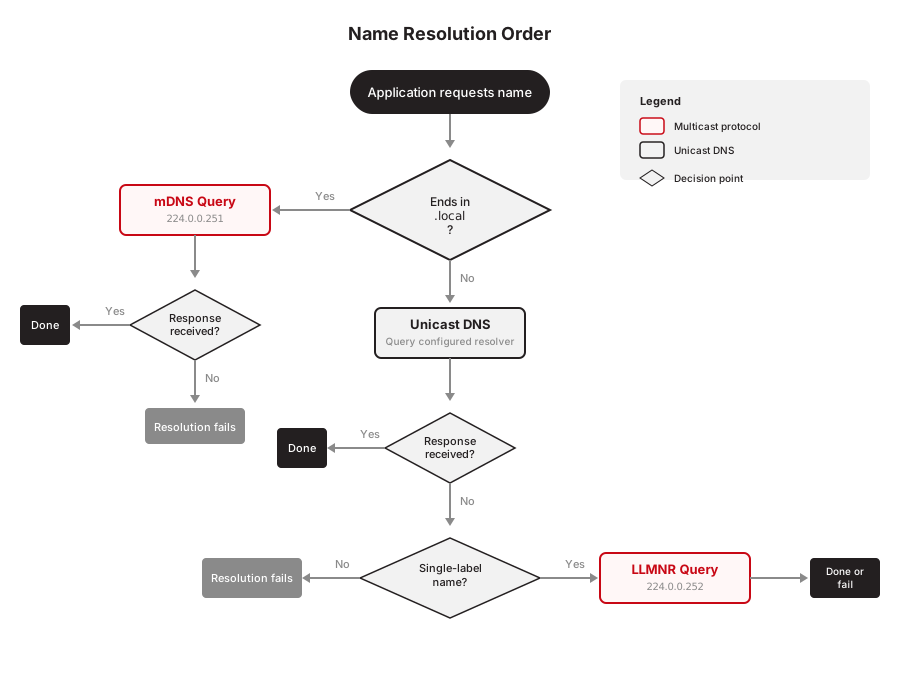
Local resolution is driven almost entirely by the client. When an application requests a name, the operating system decides which mechanisms to try and in what order, based on its configuration and sometimes the name itself:
- The application passes a hostname to the OS resolver.
- The resolver applies local rules and suffix handling.
- The resolver works through the mechanisms it has, some mix of mDNS, LLMNR, and unicast DNS, in an order that varies by platform and by name.
Unlike DNS, local protocols involve no recursion and no delegation, and no shared resolver cache sits between clients. Each host answers for itself, and clients cache what they hear under the protocol’s own rules. If no host responds, the name fails or falls to the next method in line.
Multicast DNS (mDNS)
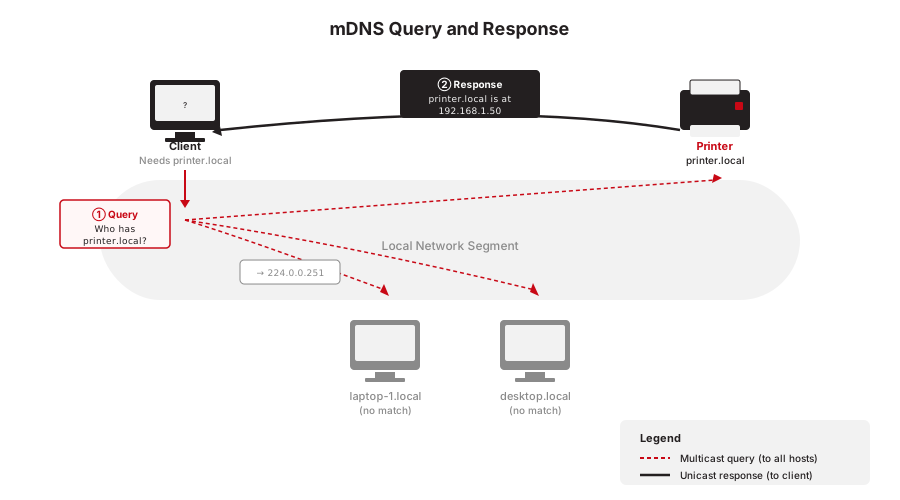
Multicast DNS, defined in RFC 6762, is most familiar as the protocol behind the .local namespace. The client multicasts its query to a well-known address on the local link. Every host receives it, and a host that believes it owns the name responds directly, usually by multicast as well. There’s no central authority and no uniqueness guarantee beyond hosts cooperating.
mDNS is tightly coupled with service discovery. DNS-Based Service Discovery (DNS-SD) builds on it to advertise printers, media servers, and the like, and on most operating systems this happens automatically and invisibly.
mDNS packets aren’t routed beyond the local link, by design. It’s a protocol for one broadcast domain.
corp.local. Windows machines resolve internal names like fileserver.corp.local without issue because Windows queries the configured DNS server for .local names by default. When macOS laptops are introduced, users on those machines can't reach any internal resource by name. macOS treats .local as a reserved mDNS namespace and sends queries for fileserver.corp.local via multicast instead of to the DNS server. No host on the local link responds via mDNS, so the lookup fails. The fix typically involves either migrating the Active Directory domain to a non-.local suffix or configuring macOS DNS resolution overrides, both of which require significant effort in an established environment.
Link-Local Multicast Name Resolution (LLMNR)
LLMNR, defined in RFC 4795, comes from Microsoft and is implemented mainly in Windows. Like mDNS it discovers hosts by multicast, but the mechanics differ. It sends queries by UDP multicast over IPv4 or IPv6, with TCP available for larger unicast responses, it reserves no special top-level domain, and in most implementations it’s attempted only for single-label names, names without dots. That heuristic fits what LLMNR is for, resolving short unqualified hostnames locally, not participating in hierarchical DNS naming.
In practice LLMNR is a fallback. When DNS can’t resolve a name and the name doesn’t qualify for mDNS, a Windows system may try LLMNR before giving up.
LLMNR has fallen out of favor, and security is the reason. Any host on the link can answer an LLMNR query and claim any name, which makes spoofing trivial for an attacker already inside the network. Many enterprises now disable LLMNR outright.
\\filesrver\finance instead of \\fileserver\finance. The DNS server returns NXDOMAIN because no record exists for the misspelled name, so Windows falls back to LLMNR and multicasts the query. The attacker's machine responds, claiming the name. The user's machine then connects to the attacker's SMB service and attempts NTLM authentication, handing over challenge-response material the attacker can relay or crack offline. This is a common finding in internal penetration tests and one reason many organizations disable LLMNR via Group Policy.
Interaction with conventional DNS
Every OS applies a resolution order that decides whether a name goes out via mDNS, LLMNR, unicast DNS, or some combination, and the order differs by platform. On macOS, names ending in .local are resolved through mDNS exclusively and never reach a configured recursive resolver. On Windows, unicast DNS generally goes first. If it fails and the name is single-label, LLMNR gets a turn, and older environments may additionally fall back to NetBIOS Name Service (NBNS), an even older protocol solving the same short-hostname problem. NBNS traffic in a packet capture usually signals this same fallback chain at work.
This ordering is why administrators see multicast traffic for names they were sure belonged to DNS. From the client’s perspective, local resolution is just part of the decision tree.
Why this matters
Local resolution explains several otherwise confusing behaviors. A hostname resolves on one machine and not another because it was never in DNS at all, only claimed by a host answering multicast. Packet captures show DNS-format packets that no DNS server ever received. The wire format is standard DNS, but the destination is a multicast group on the local link.
These protocols also trade away certainty. Multiple hosts can claim one name, responses are unauthenticated, and behavior depends on per-device settings. That tradeoff is fine on a home network and gets harder to live with as the network grows.
Summary
mDNS and LLMNR let hosts resolve names on networks with no DNS infrastructure, by asking the local link instead of a central resolver. Operating systems fold them into a client-side resolution order alongside unicast DNS, and that order depends on the platform and the name.
The answers come from whichever host claims the name, with no authority behind them. That’s enough for a home network to find a printer, and it’s why an attacker on the link can claim a mistyped server name, which is the reason so many enterprises disable LLMNR.