The name an application asks the operating system to resolve isn’t always the name that gets queried in DNS. In many environments, the client rewrites the name first by appending one or more search domains, a process usually called suffix expansion.
This is a reliable source of confusion. Engineers expect a single DNS query and instead find several, aimed at fully qualified names nobody typed, sometimes touching internal domains that never appeared on screen.
The search list
A search domain is a DNS suffix the operating system may append to a name that isn’t already fully qualified. Search domains are configured per interface or per resolver, and typically arrive via DHCP, VPN configuration, or manual settings.
Typical entries are corporate domains like corp.example, site-specific domains such as office.localdomain, or an ordered list of several. The search list is the client resolver’s recipe for turning a short name into one or more fully qualified candidates.
Fully qualified versus relative names
Suffix expansion hinges on whether a name counts as fully qualified.
A fully qualified domain name (FQDN) explicitly ends at the DNS root, written with a trailing dot: www.example.com.. Most applications omit the dot, and many resolvers treat any name containing at least one dot as potentially complete.
A relative name gives no such signal: printer, db01, service.internal. Relative names are the candidates for expansion.
How suffix expansion works
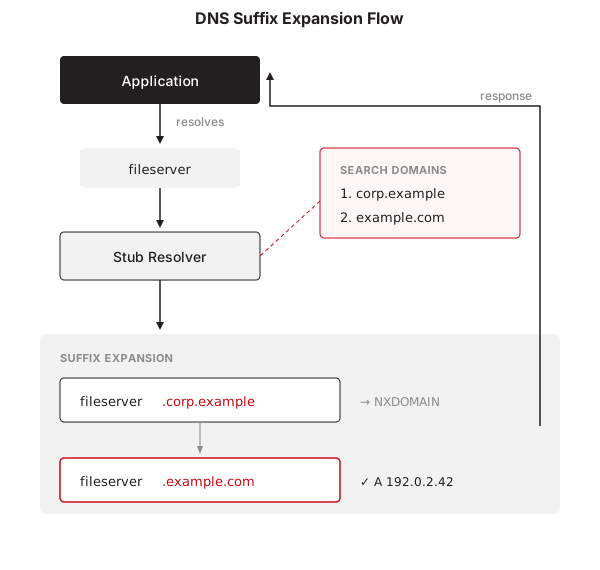
When an application submits a relative name, the stub resolver runs a simple loop:
- Start with the name exactly as provided.
- Append each configured search domain in order.
- Query each resulting name until one resolves or the list runs out.
With a search list of corp.example and example.com, a lookup for fileserver becomes queries for fileserver.corp.example, then fileserver.example.com. Some clients then try the bare name as an absolute query, and others reorder the attempts based on ndots or platform rules.
This loop is why packet captures so often show a burst of DNS queries for what the user experienced as one lookup.
How to bypass suffix expansion
When predictable queries matter, in testing, troubleshooting, and automation, there are ways to force literal resolution:
- A trailing dot marks the name as fully qualified:
example.com.skips expansion entirely. This is the reliable per-query mechanism. - Removing search domains from the resolver configuration reduces expansion, but the result is implementation-dependent. Some resolvers fall back to a search list derived from the hostname when
resolv.confhas nosearchordomainentries. - Some diagnostic tools sidestep expansion on their own.
digdoesn’t apply the search list unless you pass+search, which is one reasondigand an application can disagree about the same name.
ndots and when expansion is skipped
Many systems implement an ndots threshold: the number of dots a name needs before the resolver tries it as absolute first.
With ndots:1:
printeris expanded using search domainsservice.internalis tried as absolute before expansion
With ndots:5, even names with several dots get expanded first. The knob is explicit on Unix-like systems using resolv.conf, while equivalent behavior exists elsewhere without being exposed.
OS-specific behavior
Suffix expansion differs by platform.
Linux and Unix-like systems
Most distributions and BSD variants follow resolv.conf semantics, but the details are implementation defined. glibc and musl differ in how strictly they apply search lists, handle ndots, and order fallbacks, and container runtimes and systemd-resolved add layers of their own.
Windows
Windows builds its DNS suffix search list from interface settings, Active Directory policy, and VPN configuration. The order is well defined but less visible, and expansion coexists with other mechanisms such as LLMNR and, in legacy configurations, NetBIOS.
macOS
macOS keeps per-interface resolver scopes, so search domains can apply to one interface and not another. The same query can expand differently depending on network state, and scutil --dns is the reliable way to see which search domains currently apply.
git differently depending on which interface the resolver selects. On Wi-Fi, git.corp.example is tried first. On the VPN, git.vpn.example takes precedence, even though the application issued the same lookup.
Why this behavior matters
The effects go beyond query volume. Expansion multiplies DNS traffic. It can leak internal naming patterns to external resolvers, since a short name plus the wrong search domain becomes an external query carrying your internal hostname. It changes which domains show up in logs and telemetry. And when early candidates time out, it adds user-visible delay to every lookup that falls through the list.
Summary
Applications don’t always send DNS the names they were given. Stub resolvers rewrite names using search lists, the rules differ by OS, and one simple lookup can fan out into several queries before anything answers.
Suffix expansion isn’t a DNS protocol feature. It’s client-side behavior, applied before any packet reaches a recursive resolver, and recognizing it explains a good share of real-world DNS surprises.